Free · Official templates

Tesla Wrap Templates

These are the official Tesla wrap templates Tesla publishes for Paint Shop, one per model and trim. Download the Tesla wrap template that matches your car, or let the AI paint it for you.

templates
12
models
5
PNG
< 1 MB
Model Y 2025+ Premium · 1024×1024✦Model Y 2025+ Standard · 1024×1024✦Model Y 2025+ Performance · 1024×1024✦Model Y L · 1024×1024✦Model Y 2020–2024 · 1024×1024✦Model 3 2024+ · 1024×1024✦Model 3 2024+ Performance · 1024×1024✦Model 3 2017–2023 · 1024×1024✦Cybertruck · 1024×768✦Model S 2021+ · 1024×1024✦Model S 2025+ Plaid · 1024×1024✦Model X 2021+ · 1024×1024✦Model Y 2025+ Premium · 1024×1024✦Model Y 2025+ Standard · 1024×1024✦Model Y 2025+ Performance · 1024×1024✦Model Y L · 1024×1024✦Model Y 2020–2024 · 1024×1024✦Model 3 2024+ · 1024×1024✦Model 3 2024+ Performance · 1024×1024✦Model 3 2017–2023 · 1024×1024✦Cybertruck · 1024×768✦Model S 2021+ · 1024×1024✦Model S 2025+ Plaid · 1024×1024✦Model X 2021+ · 1024×1024✦

Model Y

5 templates
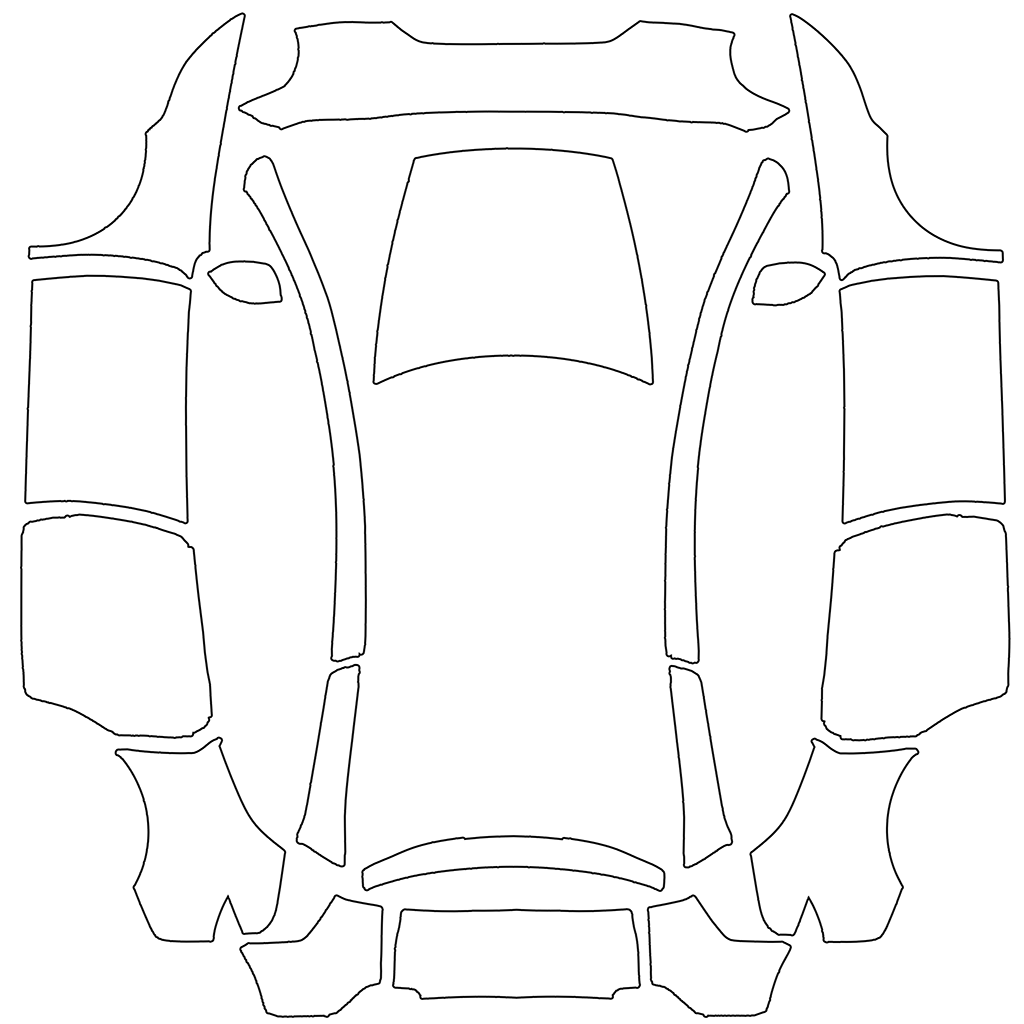
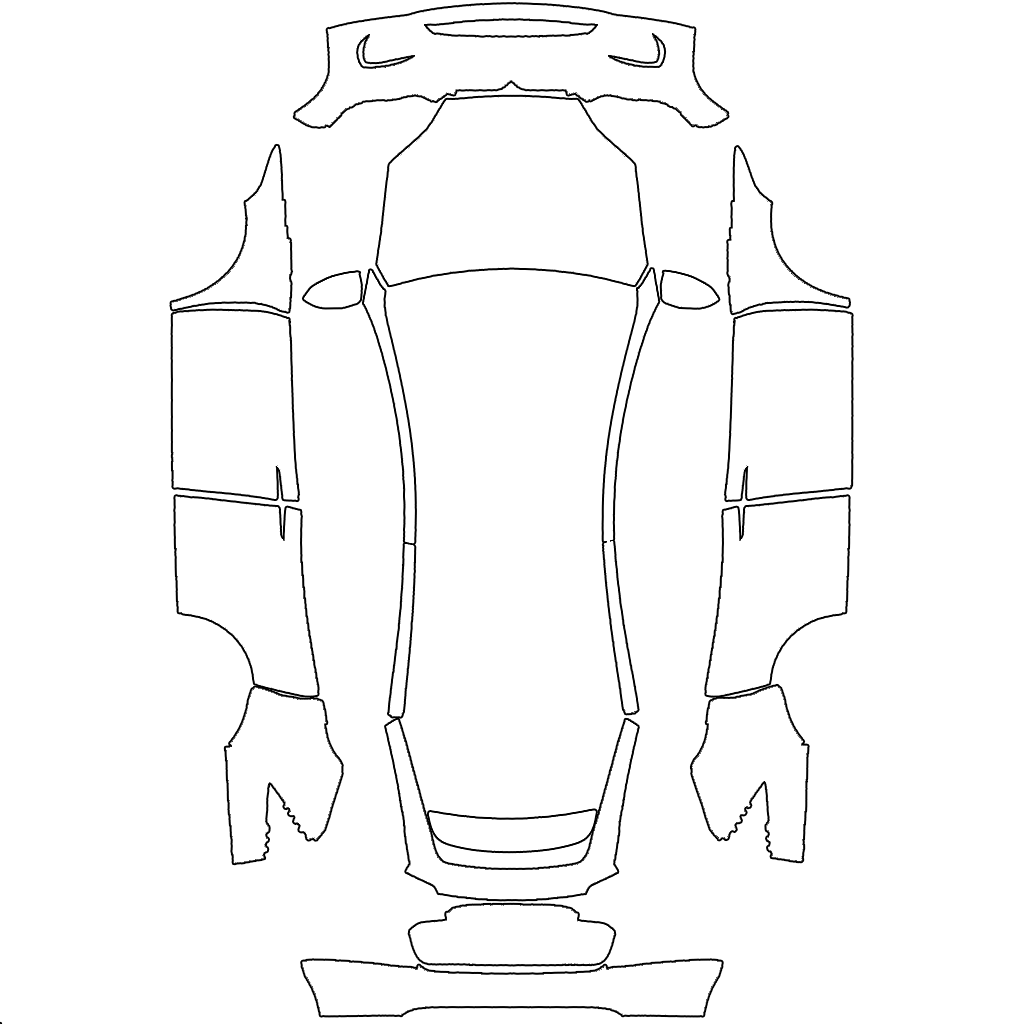
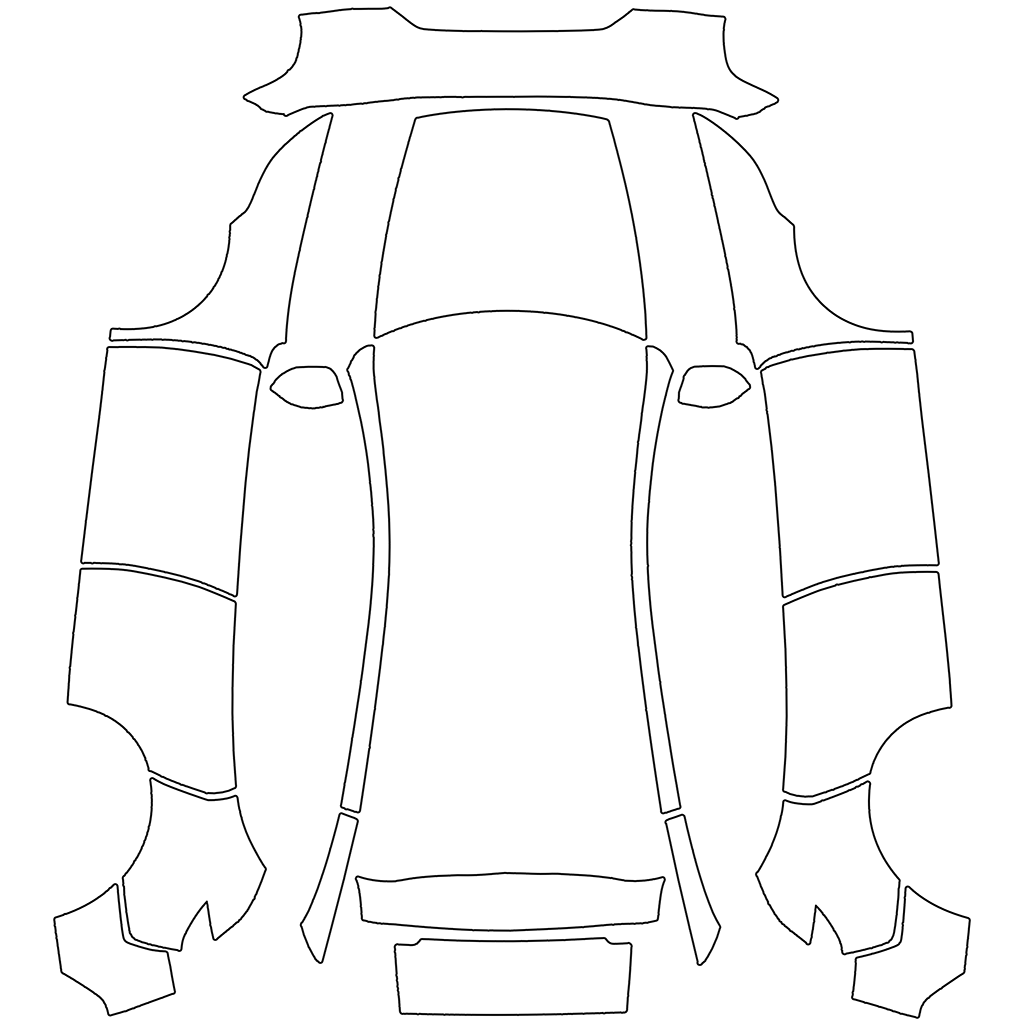
Official Tesla Paint Shop template for Model Y 2025+ Premium1024×1024 PNG

Model Y 2025+ Premium

The 2025 "Juniper" refresh with the full-width light bar, Premium trim.

Panel layout +
  • The wide shape at the very top center is the FRONT BUMPER; the ground is toward the top of the image.
  • The large shape at the top center is the HOOD; the car's front is toward the top of the image.
  • The LEFT column of shapes is the car's LEFT side and the RIGHT column is the car's RIGHT side (a mirror image). From top to bottom each column holds the front fender, front door, rear door and rear quarter panel.
  • In both side columns the car's front points UP and the roofline edge faces the center of the image. Anything meant to run along the length of the car (stripes, lettering, a fish swimming forward) must therefore run VERTICALLY in the side columns, with 'forward' pointing up.
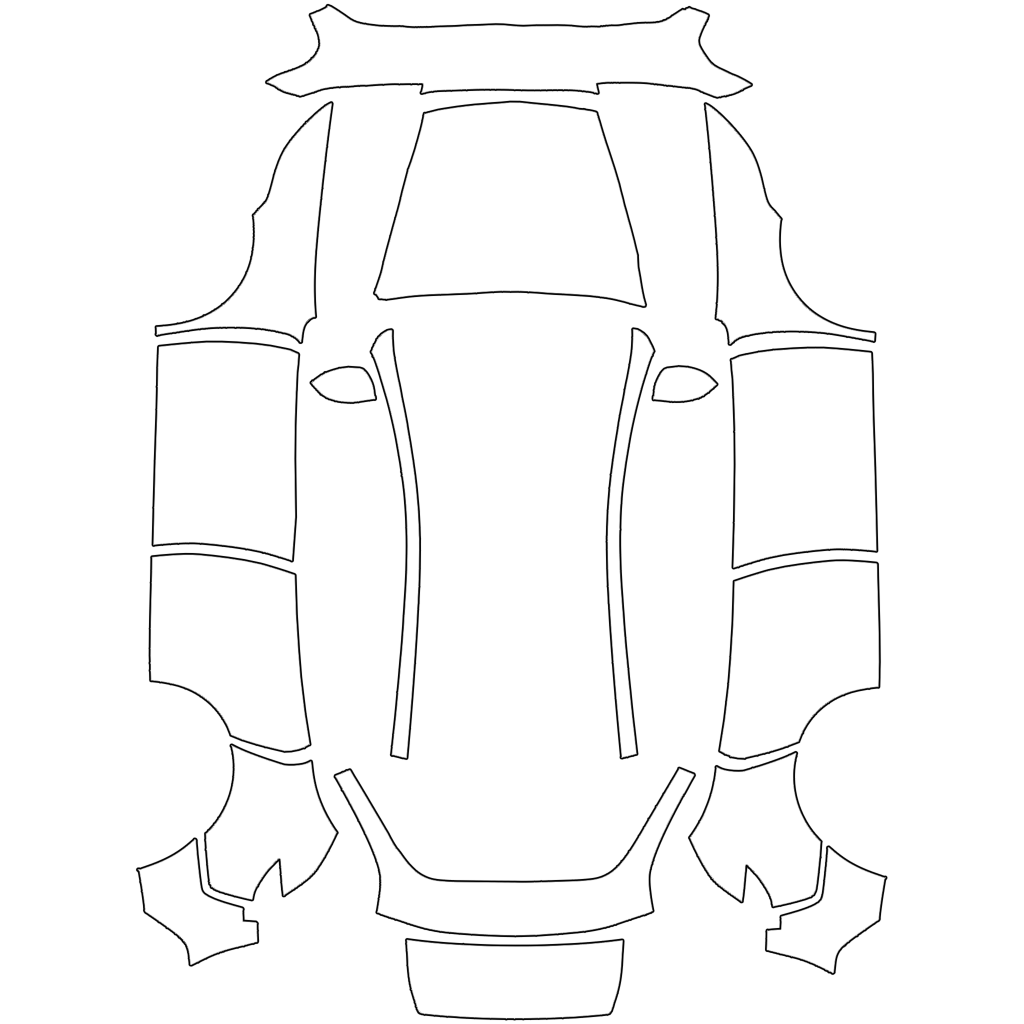
Official Tesla Paint Shop template for Model Y 2025+ Standard1024×1024 PNG

Model Y 2025+ Standard

The 2025 refresh in Standard trim.

Panel layout +
  • The wide shape at the very top center is the FRONT BUMPER; the ground is toward the top of the image.
  • The large shape at the top center is the HOOD; the car's front is toward the top of the image.
  • The LEFT column of shapes is the car's LEFT side and the RIGHT column is the car's RIGHT side (a mirror image). From top to bottom each column holds the front fender, front door, rear door and rear quarter panel.
  • In both side columns the car's front points UP and the roofline edge faces the center of the image. Anything meant to run along the length of the car (stripes, lettering, a fish swimming forward) must therefore run VERTICALLY in the side columns, with 'forward' pointing up.
Official Tesla Paint Shop template for Model Y 2025+ Performance1024×1024 PNG

Model Y 2025+ Performance

The 2025 refresh Performance with its own bumpers and wheels.

Panel layout +
  • The wide shape at the very top center is the FRONT BUMPER; the ground is toward the top of the image.
  • The large shape at the top center is the HOOD; the car's front is toward the top of the image.
  • The LEFT column of shapes is the car's LEFT side and the RIGHT column is the car's RIGHT side (a mirror image). From top to bottom each column holds the front fender, front door, rear door and rear quarter panel.
  • In both side columns the car's front points UP and the roofline edge faces the center of the image. Anything meant to run along the length of the car (stripes, lettering, a fish swimming forward) must therefore run VERTICALLY in the side columns, with 'forward' pointing up.
Official Tesla Paint Shop template for Model Y L Six-seat1024×1024 PNG

Model Y L Six-seat

The long-wheelbase six-seat Model Y.

Panel layout +
  • The wide shape at the very top center is the FRONT BUMPER; the ground is toward the top of the image.
  • The LEFT column of shapes is the car's LEFT side and the RIGHT column is the car's RIGHT side (a mirror image). From top to bottom each column holds the front fender, front door, rear door and rear quarter panel.
  • In both side columns the car's front points UP and the roofline edge faces the center of the image. Anything meant to run along the length of the car (stripes, lettering, a fish swimming forward) must therefore run VERTICALLY in the side columns, with 'forward' pointing up.
  • Small shapes next to the hood are the mirror caps; thin strips along the hood are roof rails and pillars.
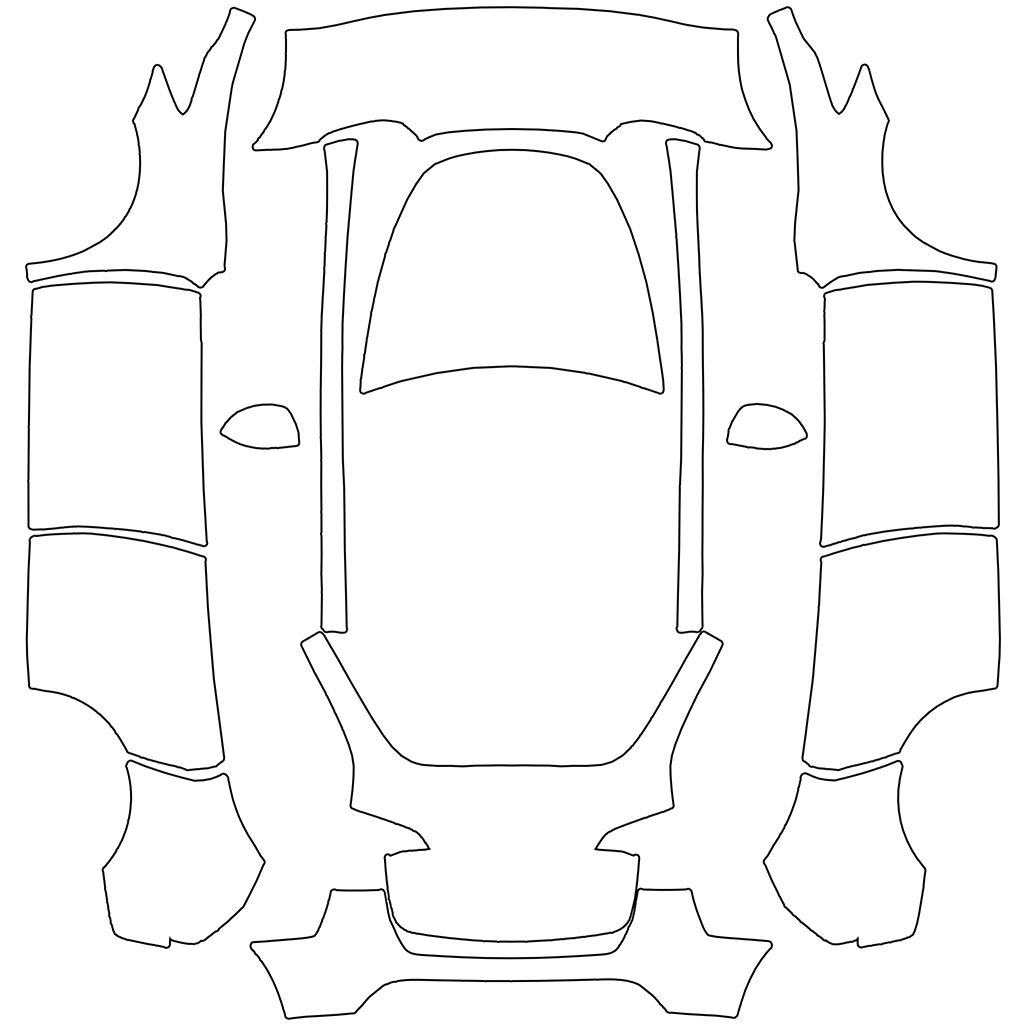
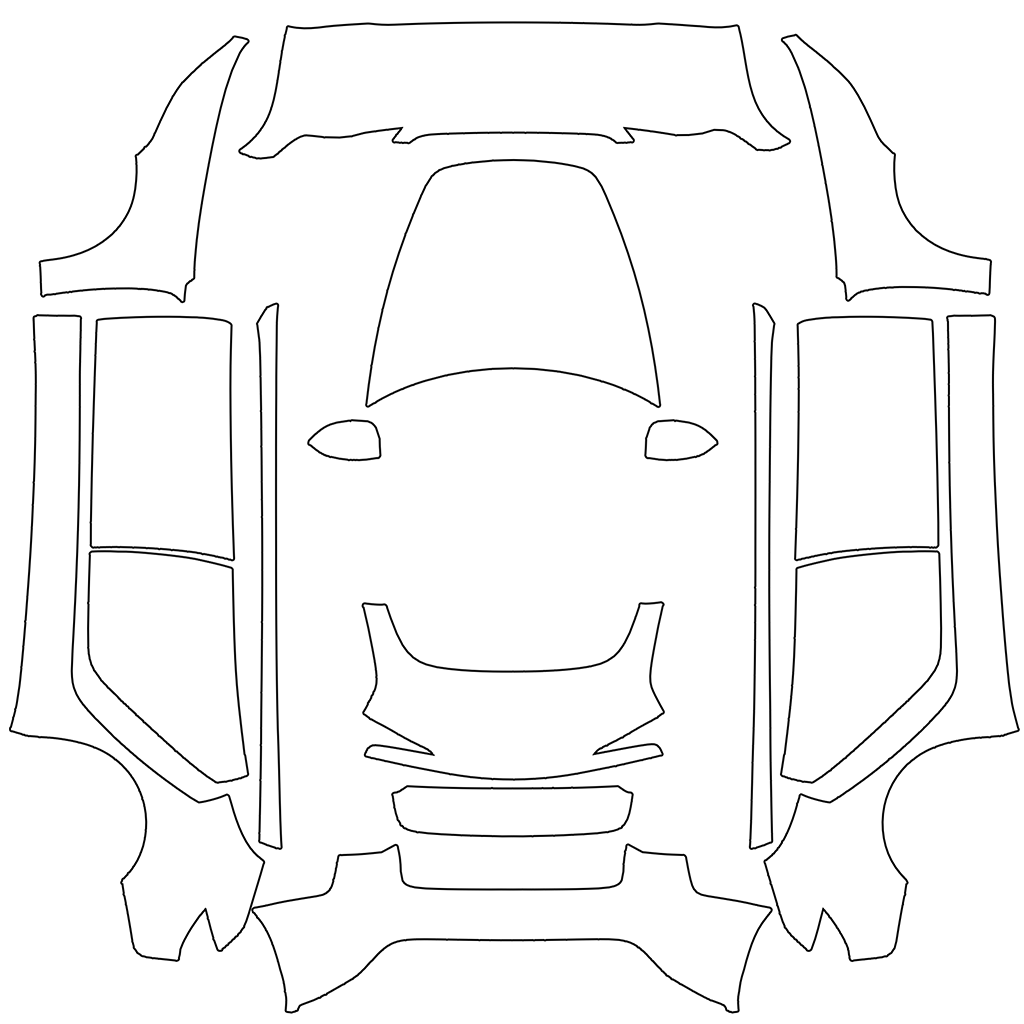
Official Tesla Paint Shop template for Model Y 2020–20241024×1024 PNG

Model Y 2020–2024

Original Model Y with separate headlights, built before the 2025 refresh.

Panel layout +
  • The large shape at the top center is the HOOD; the car's rear is toward the top of the image.
  • The LEFT column of shapes is the car's LEFT side and the RIGHT column is the car's RIGHT side (a mirror image). From top to bottom each column holds the front fender, front door, rear door and rear quarter panel.
  • In both side columns the car's front points UP and the roofline edge faces the center of the image. Anything meant to run along the length of the car (stripes, lettering, a fish swimming forward) must therefore run VERTICALLY in the side columns, with 'forward' pointing up.
  • The shapes at the bottom center are the liftgate/trunk and the REAR BUMPER; the car's rear is toward the top of the image.

Model 3

3 templates
Official Tesla Paint Shop template for Model 3 2024+ Standard & Premium1024×1024 PNG

Model 3 2024+ Standard & Premium

The "Highland" refresh with slim headlights and no fog-light cutouts.

Panel layout +
  • The large shape at the top center is the HOOD; the car's front is toward the top of the image.
  • The LEFT column of shapes is the car's LEFT side and the RIGHT column is the car's RIGHT side (a mirror image). From top to bottom each column holds the front fender, front door, rear door and rear quarter panel.
  • In both side columns the car's front points UP and the roofline edge faces the center of the image. Anything meant to run along the length of the car (stripes, lettering, a fish swimming forward) must therefore run VERTICALLY in the side columns, with 'forward' pointing up.
  • The shapes at the middle center are the liftgate/trunk and the REAR BUMPER; the car's front is toward the top of the image.
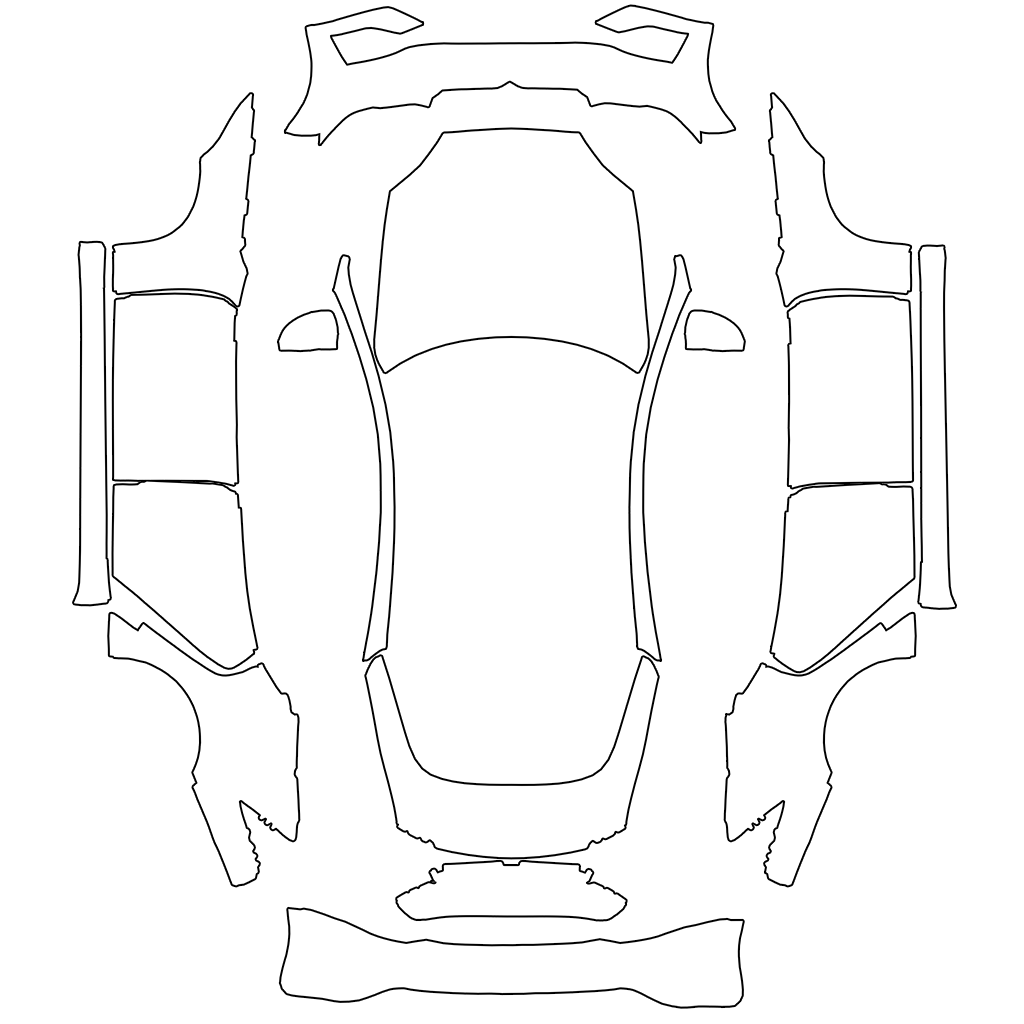
Official Tesla Paint Shop template for Model 3 2024+ Performance1024×1024 PNG

Model 3 2024+ Performance

Highland Performance with the vented front bumper and rear spoiler.

Panel layout +
  • The large shape at the top center is the HOOD; the car's front is toward the top of the image.
  • The LEFT column of shapes is the car's LEFT side and the RIGHT column is the car's RIGHT side (a mirror image). From top to bottom each column holds the front fender, front door, rear door and rear quarter panel.
  • In both side columns the car's front points UP and the roofline edge faces the center of the image. Anything meant to run along the length of the car (stripes, lettering, a fish swimming forward) must therefore run VERTICALLY in the side columns, with 'forward' pointing up.
  • The shapes at the middle center are the liftgate/trunk and the REAR BUMPER; the car's front is toward the top of the image.
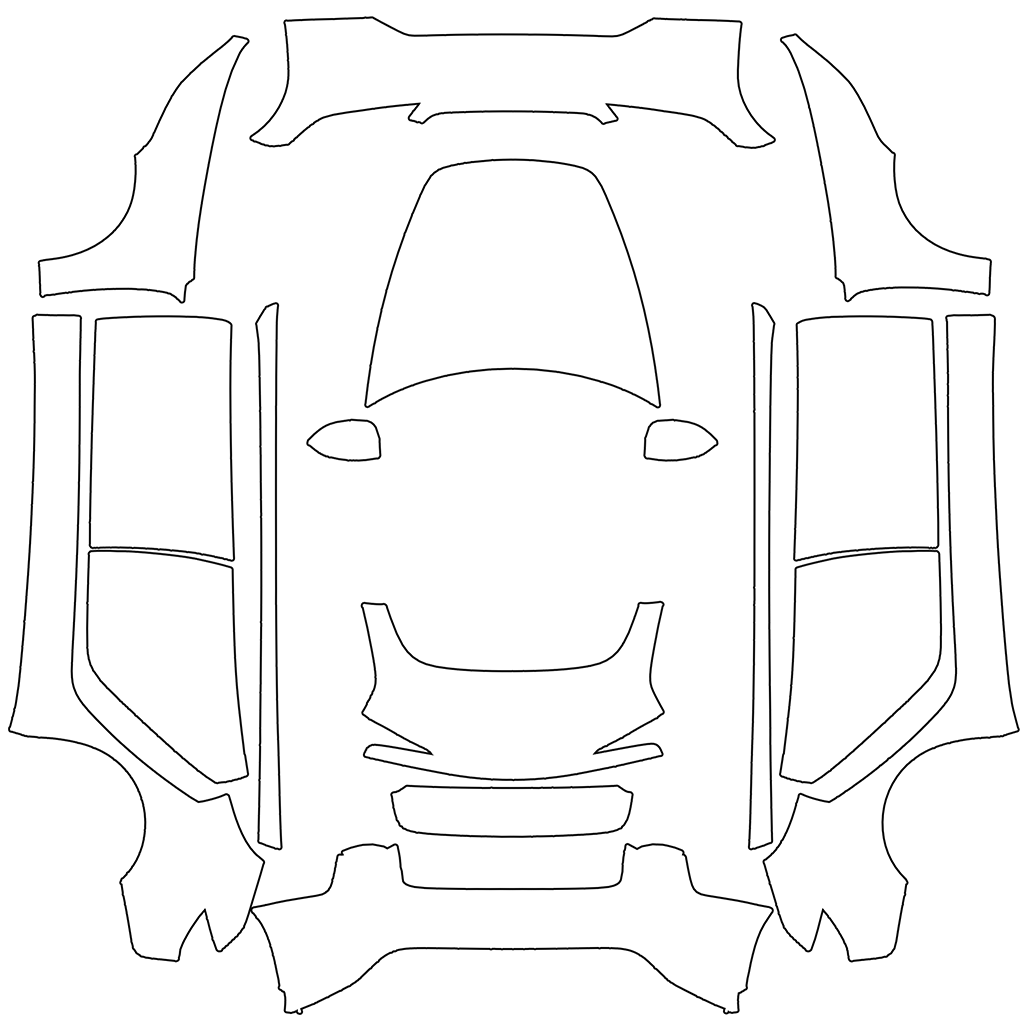
Official Tesla Paint Shop template for Model 3 2017–20231024×1024 PNG

Model 3 2017–2023

Model 3 before the 2024 refresh, with fog lights in the front bumper.

Panel layout +
  • The wide shape at the very top center is the FRONT BUMPER; the ground is toward the top of the image.
  • The large shape at the top center is the HOOD; the car's rear is toward the top of the image.
  • The LEFT column of shapes is the car's LEFT side and the RIGHT column is the car's RIGHT side (a mirror image). From top to bottom each column holds the front fender, front door, rear door and rear quarter panel.
  • In both side columns the car's front points UP and the roofline edge faces the center of the image. Anything meant to run along the length of the car (stripes, lettering, a fish swimming forward) must therefore run VERTICALLY in the side columns, with 'forward' pointing up.

Cybertruck

1 template
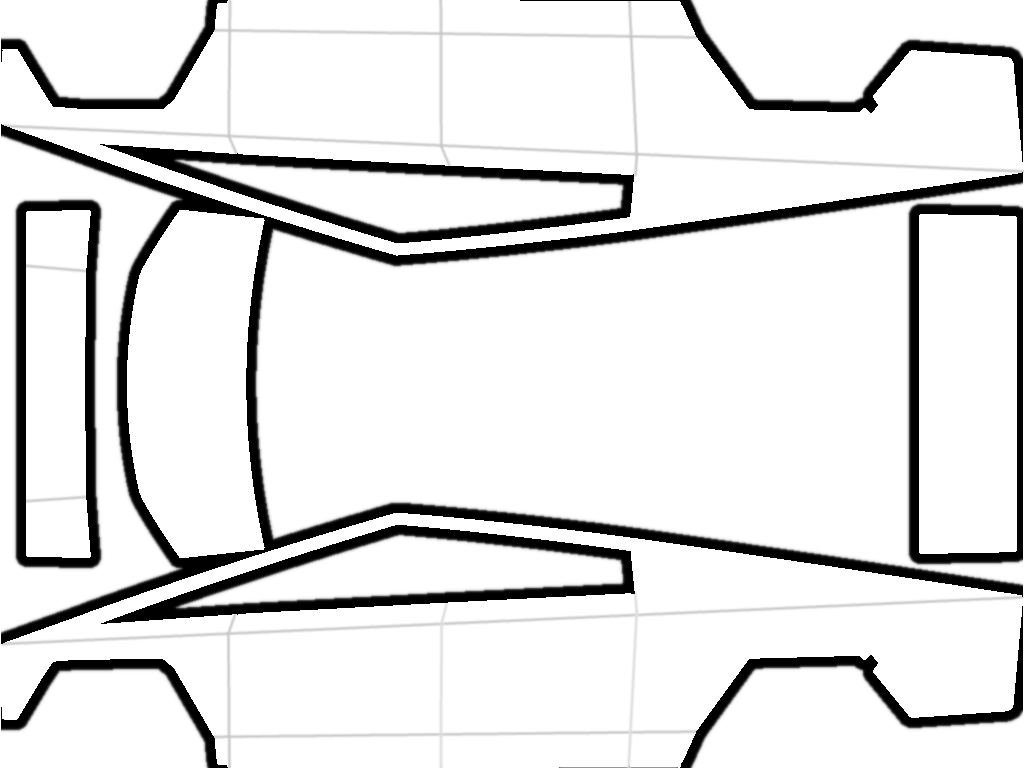
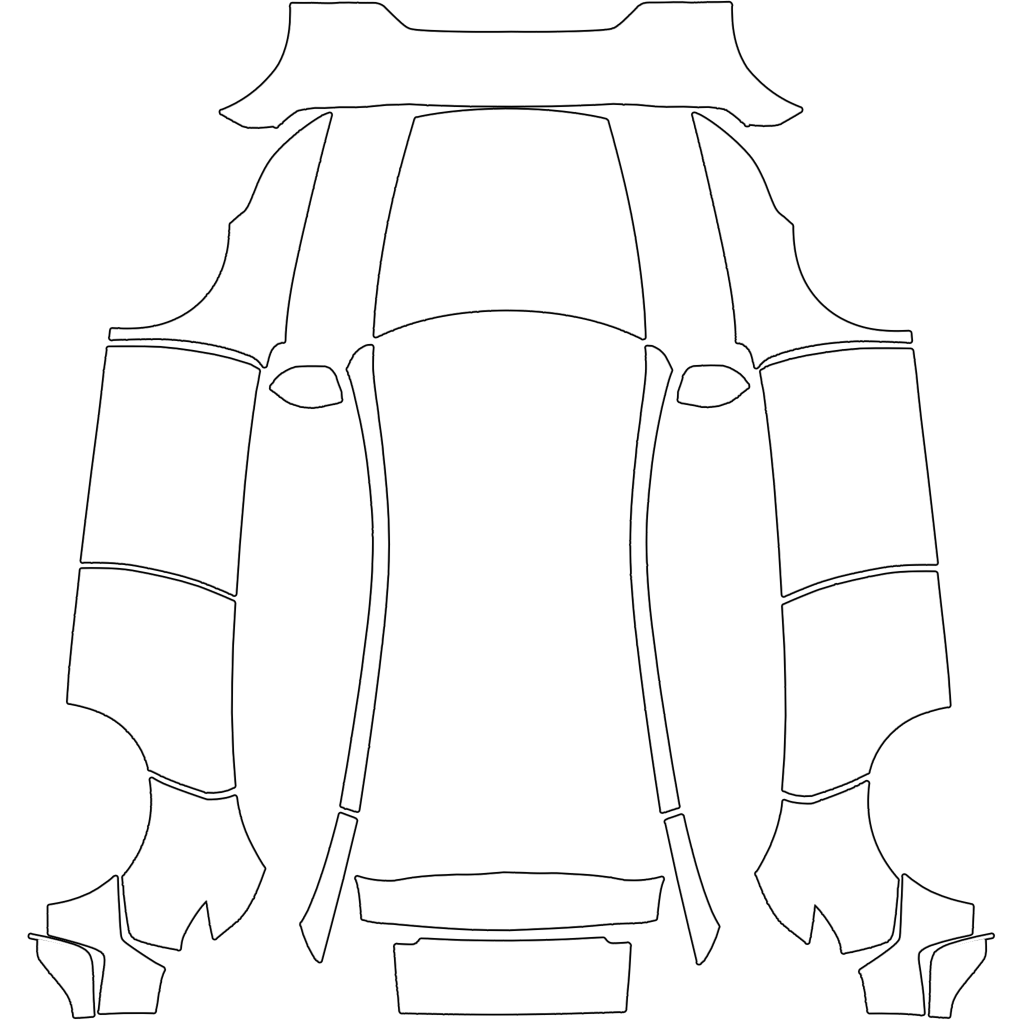
Official Tesla Paint Shop template for Cybertruck All1024×768 PNG

Cybertruck All

One template covers every Cybertruck. Its map is 1024×768.

Panel layout +
  • This Cybertruck map is 1024×768 and laid out horizontally.
  • The long strip across the TOP of the image is the truck's RIGHT side, drawn upside down: its lower edge is at the top of the image and the front of the truck is at the LEFT.
  • The long strip across the BOTTOM is the truck's LEFT side, upright: roof edge on top, front of the truck at the LEFT.
  • In the middle row, the shapes at the far left are the front (fascia and frunk lid) and the tall shape at the far right is the tailgate.

Model S

2 templates
Official Tesla Paint Shop template for Model S 2021+1024×1024 PNG

Model S 2021+

The 2021 "Palladium" refresh with the yoke-era interior.

Panel layout +
  • The wide shape at the very top center is the FRONT BUMPER, drawn with its lower edge toward the top of the image.
  • The large shape below it in the center is the HOOD, with the car's front toward the top.
  • The LEFT column of shapes is the car's LEFT side and the RIGHT column is the car's RIGHT side (a mirror image), front fender at the top down to the rear quarter panel at the bottom.
  • In both side columns the car's front points UP and the roofline faces the center of the image, so anything meant to run along the car's length must run VERTICALLY there.
Official Tesla Paint Shop template for Model S 2025+ Plaid1024×1024 PNG

Model S 2025+ Plaid

The 2025 Model S Plaid update.

Panel layout +
  • The wide shape at the very top center is the FRONT BUMPER, drawn with its lower edge toward the top of the image.
  • The large shape below it in the center is the HOOD, with the car's front toward the top.
  • The LEFT column of shapes is the car's LEFT side and the RIGHT column is the car's RIGHT side (a mirror image), front fender at the top down to the rear quarter panel at the bottom.
  • In both side columns the car's front points UP and the roofline faces the center of the image, so anything meant to run along the car's length must run VERTICALLY there.

Model X

1 template
Official Tesla Paint Shop template for Model X 2021+1024×1024 PNG

Model X 2021+

The 2021 refresh of Model X.

Panel layout +
  • The wide shape at the very top center is the FRONT BUMPER, drawn with its lower edge toward the top of the image.
  • The large shape below it in the center is the HOOD, with the car's front toward the top.
  • The LEFT column of shapes is the car's LEFT side and the RIGHT column is the car's RIGHT side (a mirror image), front fender at the top down to the rear quarter panel at the bottom.
  • In both side columns the car's front points UP and the roofline faces the center of the image, so anything meant to run along the car's length must run VERTICALLY there.
02Panel inspector

Read a Tesla wrap template like a map

Hover any shape on a Tesla wrap template and the matching panel lifts off the 3D car. The readout names the panel and shows which way is up, so you know how to paint it before you open an editor.

Model Y 2025+ Premium Paint Shop template with labeled panels
Paint Shop map · 1024×1024
Live 3D
Panel
––
of 00
Hover or tap a panel on the map
↑ Image up
—
→ Image right
—
Share of the map
—

Directions are measured on Tesla's UV-mapped 3D models for each Tesla wrap template.

01

What a Tesla wrap template is

A Tesla wrap template is a flat UV map of the car's body. Each white shape is one body panel: hood, fenders, doors, bumpers and so on. Paint Shop wraps whatever you paint inside those shapes onto the 3D car on your touchscreen. Anything outside the shapes is ignored.

Every Tesla wrap template on this page comes from Tesla's public custom-wraps repository, so the shapes match what the car expects.

02

Picking the right Tesla wrap template

Match the model, the year range and the trim. Model Y has five templates, Model 3 has three, and Cybertruck has one. Each card above lists how to tell the versions apart. A design made on the wrong Tesla wrap template lands crooked, because the door and bumper shapes move between generations.

03

Filling a template by hand

Open the Tesla wrap template in any image editor, put your artwork on a layer below or above it, and paint inside the white shapes. Remove the black outlines before exporting, or they show up as dark seams on the car.

Watch the orientation: in most templates the side panels run top to bottom with the car's front pointing up, so anything that should run along the car must run vertically in the image. The Cybertruck template is horizontal with its right side drawn upside down. The panel inspector shows the direction of every shape.

04

Exporting for Paint Shop

Save a PNG at the Tesla wrap template's size (1024×1024, or 1024×768 for Cybertruck), under 1 MB, with a file name of up to 30 letters, numbers, spaces, dashes or underscores. If your file is too big, the free 3D Preview & PNG Fixer shrinks it without changing the size.

05

Or skip the editor

The Tesla wrap generator paints the template for you from a sentence or a photo, keeps the design straight on every panel and exports a file that already meets Tesla's rules. Every generated wrap also gets a share link that opens it in 3D.

04Features

What you get with each Tesla wrap template

01

Official shapes

Straight from Tesla's custom-wraps repository, one Tesla wrap template per model and trim.

02

Panel names and directions

Hover to see which panel each shape is and which way the image points on the car.

03

AI fill in one click

Design with AI opens the generator with that Tesla wrap template already selected.

04

Free PNG fixer

Resize, trim and compress a hand-made wrap so Paint Shop accepts it.

05FAQ

Tesla wrap template FAQ

Where do these templates come from?

From Tesla's public custom-wraps repository on GitHub. They are the same Tesla wrap template files Tesla links to for Paint Shop.

Which template matches my car?

Match the model, the year range and the trim. Each card above explains how to tell the versions apart.

Can I print these templates for a real vinyl wrap?

No. They are low-resolution maps for the 3D car on the screen. Physical vinyl wraps need full-size files from a wrap shop.

Why are there gaps between the shapes?

Those are the gaps between body panels. Leave them empty; Paint Shop ignores anything outside the shapes of the Tesla wrap template.

Why does my design look sideways on the car?

The side panels in most templates run nose-up. Use the panel inspector to check each shape's direction, or let the generator handle it.

Your Tesla has one paint color. The screen doesn't have to.

Describe a look or upload a photo and see it on your car in about a minute.

Start a wrap